

In advertising, pacing ad delivery is key to success. “Too hot” you blow your budget. “Too cold” you fall short on results. Here’s how to deliver “just right.”
What is Pacing in Ad Delivery?
In advertising, ad delivery pacing means comparing the actual delivery of your ads to the planned delivery of your ads.
Pacing is typically expressed as a percentage discrepancy from the planned amount. For example, a pace of “+23.3%” means you delivered 23.3% more than expected. A pace of “-7.4%” means you delivered 7.4% less than expected.
For a detailed description of pacing, read “What is ‘Pacing’ in Advertising? Here’s the Formula.”
Why is Pacing of Ad Delivery so Important?
When gaining media authorization in the media planning process, you make promises on the delivery of advertising across all the advertising placements in your media plan.
Your promises take various forms, including:
- For each placement, a month-by-month budget for media spending.
- For each digital placement, month-by-month (or day-by-day) goals for impressions.
- For each broadcast media placement, week-by-week goals for spots.
The common theme is promising to reach the target audience with the advertising message.
If you deliver ads too fast (or “too hot”), you’ll blow your budget. You’ll either run out of money before the end of your campaign or overspend.
If you deliver ads too slowly (or “too cold”), you won’t achieve the reach or frequency you planned. As a result, you’ll probably fall short of the advertising objectives behind your media budget.
When advertising, you want to deliver your ads “just right” in the “Goldilocks Zone.”
The Problem with Ad Delivery Pacing
If done manually, monitoring ad delivery pacing is labor-intensive.
You can do all of this in Excel. However, it’s mind-numbing work that steals time away from more valuable activities. Here’s an overview of the process.

Set Your Baselines
For starters, you’ll need to establish all your ad delivery goals. This means taking every placement in your media plan and breaking down spending, impressions, and spots into periodic goals (by day, by week, by month, etc.).
Gather Performance Data
Once your ads start running, you’ll need to periodically gather ad deliver data (spending, impressions, spots) from each of the ad delivery platforms in your media plan.
Calculate Pacing
Next, you perform hundreds of calculations comparing actual performance to planned performance. Each of these calculations is simple math. The problem is there’s just an overwhelming number of calculations to perform.
Report on Pacing
Finally, you can report on your pacing. You have all the data. This can be displayed in tabular reports or visually through a pacing chart.
The Right Way to Do Ad Delivery Pacing
At this point, you’re probably thinking, “a computer should do all of this.” You’re right. Although this is terrible work for us humans, this is ideal work for a computer.
Unlike other software that only solves part of this problem at best, Bionic for Agencies gives you a complete system for tracking ad delivery pacing across all media channels, online and offline.
Set a Baseline

As an invisible by-product of your media planning, Bionic automatically breaks down each of your placements into day-by-day goals for spending, impressions, spots, and all of your other KPIs.
Gather Performance Data

When your ads start running, Bionic automatically gathers performance data from all of your platforms, cleans and standardizes the data, imports it, and performs zillions of pacing calculations.
Report on Pacing

When you show up to work in the morning, Bionic has ready for you all the pacing reports through yesterday.
You no longer have to wait until the end of the month to discover discrepancies. You can nip problems in the bud as you sip your morning coffee. Bionic makes it easy for you to re-flow your media budgets.
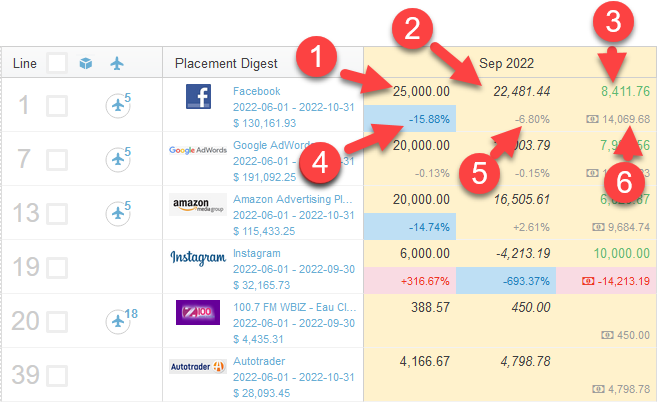
You can visualize pacing reports directly in the Bionic app, through Bionic Data Studio (Looker) dashboards, of through your favorite dashboarding tool (Tableau, Datorama, Domo, etc.).
How to Automate Ad Delivery Pacing
If you’re already on Bionic, you’ve already got all the tools above as part of your standard subscription. You may have to set up some integrations to gather performance data. Please contact the Bionic support team for help in getting this set up.
If you’re not yet using Bionic, what are you waiting for? It’s easy to get started.
Hundreds of agencies like yours have already successfully “installed” Bionic. (There’s actually no software to install. It’s 100% web based.) You can be up and running literally today – most create their first media plan on the same day they sign up!
For a risk-free trial, go to Start a Trial.