

Every advertiser loves KPIs. But setting KPI goals is hard. Tracking progress against KPI goals is even harder. Here’s how to automate your entire KPI workflow.
What is a KPI?
In the context of advertising media planning or media buying, a KPI, or Key Performance Indicator, is a measurable value that demonstrates how effectively you are achieving your key business objectives.
Your objectives might include brand awareness, sales conversions, customer engagement, or others. There are hundreds of KPIs, efficiency metrics, and effectiveness metrics available to you.
- Core KPIs include impressions, views, clicks, engagements, conversions, and sales.
- Efficiency metrics include cost per thousand impressions (CPM), cost per click (CPC), cost per acquisition (CPA).
- Effectiveness metrics include click through rate (CTR), conversion rate (CVR), return on ad spend ROAS), and Lifetime Value (LTV).
To focus your energy, the Association of National Advertisers (ANA) recommends tracking “Media KPIs That Matter.”
The Problems with KPIs
KPIs are powerful tools that add transparency and accountability to advertising. However, they can come at a cost. If used incorrectly, they will distract you from your true business objectives.
Some common problems at advertising agencies.
Not Aligned with Business Goals
Modern digital advertising platforms spew data. It’s a common mistake to take all this easy data and throw it on a dashboard. A better, but more difficult, approach is to start with business goals then source the KPIs.
For more on this topic, see 12 Marketing KPIs You Should Be Tracking for Media Buying.
Disconnected from Workflow
Most KPI tracking systems are disconnected from day-to-day media buying workflow. This means those making tactical media investment decisions are flying blind with respect to KPIs.
Reports show up periodically on PowerPoint slides in a meeting. By the time you see the results, it’s too late to fix the problems.
Slow and Labor-Intensive
Because KPIs are disconnected from the workflow, KPIs require extra effort:
- Goal Setting: While media planning, you need to establish day-by-day goals for each KPI in every placement in your media plan.
- Data Gathering: As your ads start running, you need to login to each of your platforms every morning to gather yesterday’s performance for each of your placements.
- Reporting: Every day, you need to present reports to your media teams showing how each of their placements are doing relative to the KPIs and identify any problems.
Who does this? To be honest, hardly anybody. It’s too much work.
Very few do a great job with KPIs. Because of the effort involved, it’s not feasible to do all this manually. At some point, you have to concede and say, “that’s all we can afford.”
How to Automate KPIs
Imagine if you could get all the benefits of KPIs without all the extra effort. How much time would you save? Would you delight your clients with daily KPI dashboards?
Your dream is real, my friend.
Bionic for Agencies was built from the ground up to give you KPI automation along with other superpowers. Bionic will automatically predict, track, and report on your KPIs.
Predict KPIs Automatically

As you’re creating your media plan, Bionic will automatically forecast goals for each of your KPIs on every line in your media plan. No extra effort required. A huge time-saver!
But Bionic doesn’t stop there.
As an invisible by-product of media planning, Bionic will break each of your KPI goals into a day-by-day plan. This gets especially complicated when weekparting and flighting are involved. No human media planner ever gets to this level of granularity without good automation like this.
Track KPIs Automatically

When your ads start running, Bionic will automatically pull in performance data for each of your placements from each of their platforms every day, like clockwork.
Even the best ad ops teams can’t keep up with daily data gathering if they’re doing it manually. This is a job fit for a robot. Bionic gives you this robot. In fact, it’s in our name.
Report on KPIs Automatically
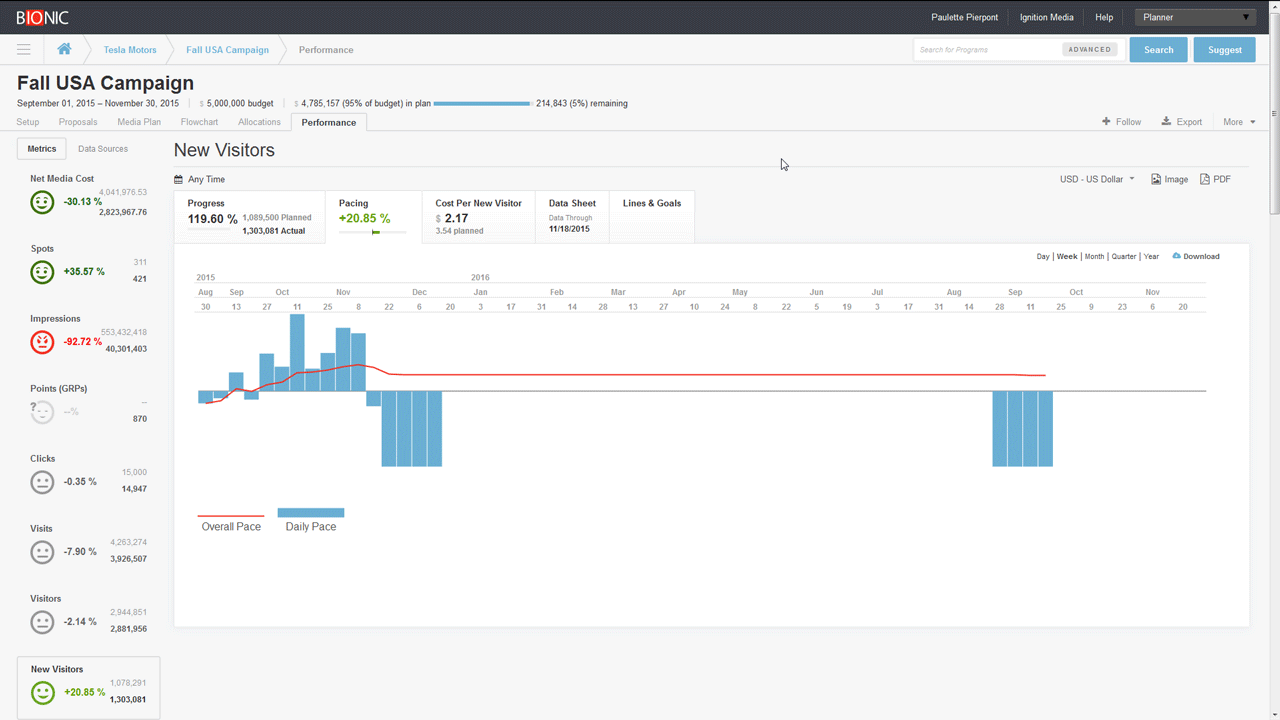
Now you have all the data you need. It’s time to display the results where it matters most:
- In the Workflow – present KPI pacing reports to media planners and media buyers directly within the Bionic media planning and buying tools they use every day.
- In Management Reports – present KPI reports to management in the Bionic app and through management dashboards.
- In Client Dashboards – present KPI pacing reports through client dashboards.
How to Get KPI Automation
If you’re already using Bionic, you already have access to all the automation described above. Please contact our support team to level up your KPI automation.
If you’re not yet using Bionic, it’s easy to get started: simply Start a Trial through our website. We can have you up and running today.