
Sending IOs through Bionic has always been simple, but now it’s even more flexible. With this update, you can send IOs to new recipients anytime using a streamlined, self-service workflow that eliminates the need to contact support.
Whether you’re working late, on the weekend, or just moving fast, Bionic now works better with your schedule.
More Flexibility, Less Waiting
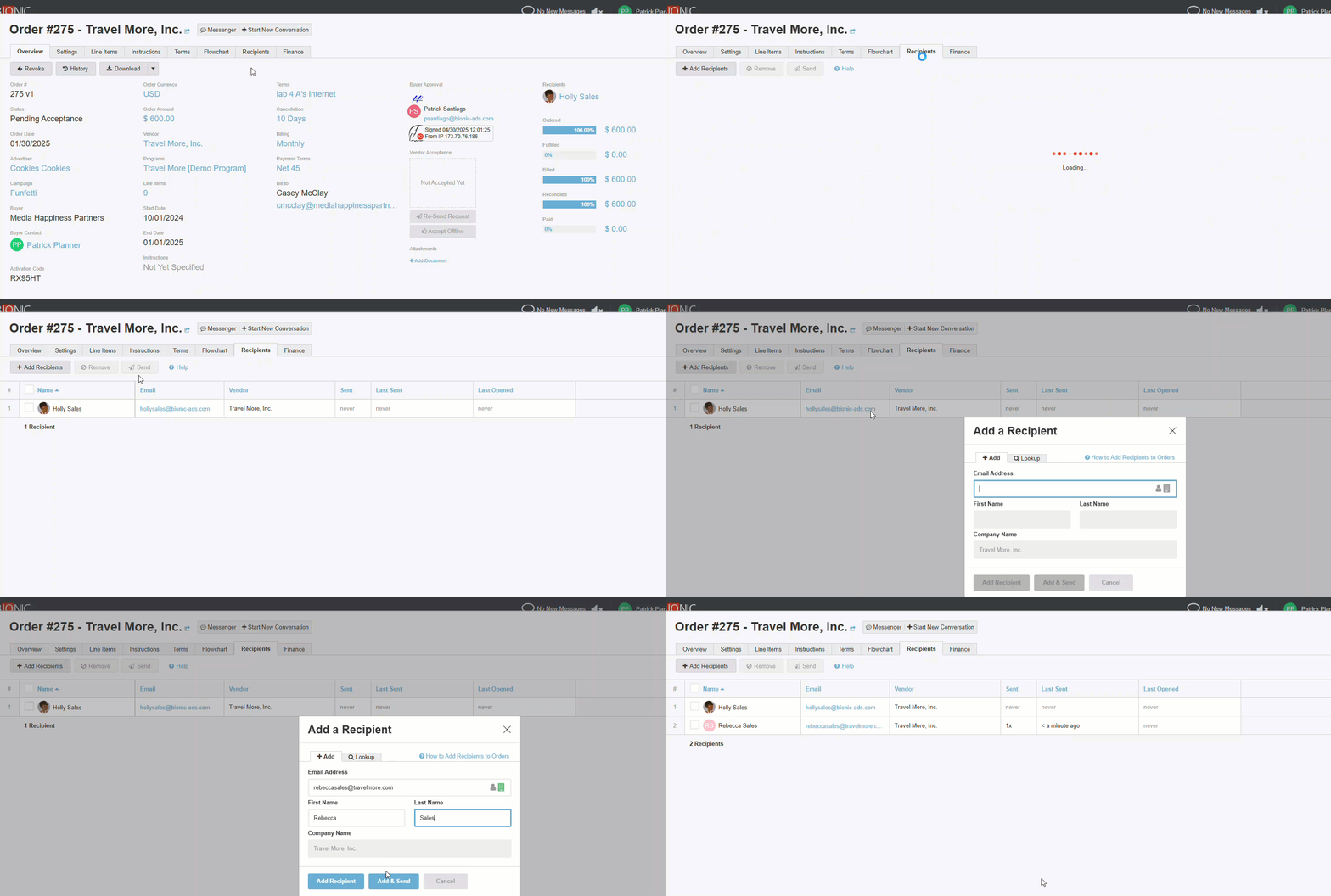
Sending an order to a recipient has always been mostly automated. But in the rare case where contacting support was needed for a new recipient, it could disrupt your momentum and cause a slowdown in your media buying process, especially if you were working outside regular business hours.
Now, that step is fully automated. Bionic takes care of everything in the background, including:
- 🧾 Setting up the new contact
- 🔐 Registering the recipient in the system
- ✉️ Sending the IO with instructions to review and respond
You get the flexibility to send IOs whenever you’re ready—no waiting, no coordination, just smooth execution.
For example, if you’re wrapping up a campaign late on a Friday night and need to get an IO out before the weekend, you can now do it on your own, no need to wait for support to come online Monday morning. It’s just one more way Bionic helps you stay in control and keep things moving.
Smarter Workflow Through Automation
This enhancement is part of Bionic’s continued investment in automation, removing friction and streamlining how you work. Once you’ve created the order and added a recipient, Bionic takes care of the rest.
It saves time, reduces dependency on support, and lets you manage your orders with greater speed and confidence.
Try It Out Now
Log in to your Bionic account to experience the new recipient workflow for orders.
Need help or have questions? Explore these resources:
- 📘 Knowledge Base: How-to guides and detailed documentation.
- 🎓 Bionic Academy: Free on-demand training with certifications.
- 🤝 Customer Support: Contact the support team directly.